Can an Aftermarket Radio Keep Bose on a 2017 Pathfinder?
If you have an older Nissan Pathfinder with the factory Bose audio system and want a larger or newer aftermarket radio, the key question is whether you can replace the factory head unit without losing the Bose system. Yes, you can install an aftermarket radio while retaining the factory Bose amplifier and speakers, but the […]
If you have an older Nissan Pathfinder with the factory Bose audio system and want a larger or newer aftermarket radio, the key question is whether you can replace the factory head unit without losing the Bose system.
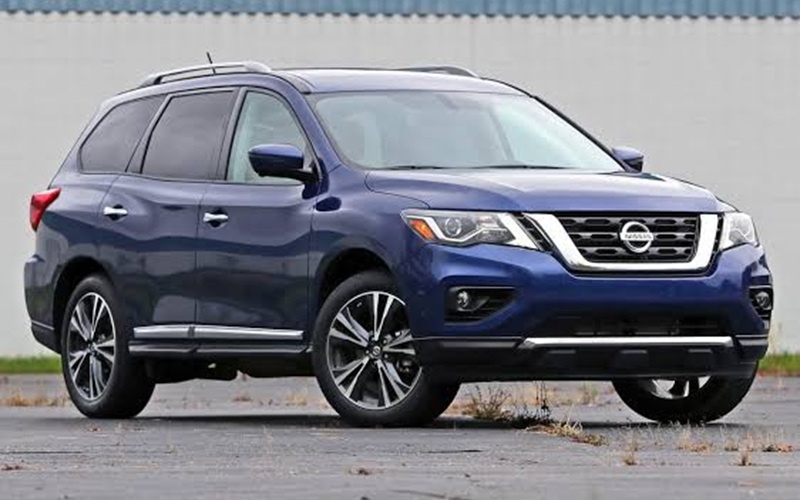
Yes, you can install an aftermarket radio while retaining the factory Bose amplifier and speakers, but the installation requires the correct vehicle-specific interface and wiring. Simply connecting a new radio directly to the factory speaker wiring may not be enough for a Pathfinder equipped with Bose.
The exact setup also depends on the original audio configuration, including whether it has navigation and other factory features.
Can You Keep Bose With an Aftermarket Radio?
Yes. This model Nissan Pathfinder was available with a 13-speaker Bose premium audio system, depending on configuration. Nissan also offered the Around View Monitor and other features that could integrate with the factory infotainment system. The Bose system uses a factory amplifier, which means the original radio and amplifier are designed to work together.
When replacing the radio, the goal is therefore not necessarily to replace the Bose amplifier. Instead, an appropriate interface lets the new head unit provide the correct signal to the existing amplifier.
Vehicle-specific Bose retention interfaces are available for Nissan applications. These interfaces convert the aftermarket radio’s output into a signal appropriate for the factory Bose amplifier and can also retain functions such as steering-wheel audio controls, depending on the interface and radio being installed.
Why Can’t You Just Connect Any Radio?
The Bose system changes the way the audio system is wired. An aftermarket radio may have speaker-level outputs, while the factory Bose amplifier is designed to receive a lower-level audio signal. A dedicated interface can bridge that difference.
For example, Nissan-specific Bose retention interfaces provide the aftermarket head unit with the appropriate connection to the factory amplifier. Some also include connections for steering-wheel controls and amplifier turn-on.
What Parts May Be Required?
The exact parts depend on the original Pathfinder equipment and the aftermarket radio selected.
A typical installation can involve:
- Aftermarket head unit
- Vehicle-specific wiring harness
- Bose amplifier-retention interface
- Steering-wheel-control interface, if required
- Antenna adapter
- Dash mounting hardware
- Additional camera or factory-feature interface where applicable
Not every installation requires every component. For example, some interfaces combine several functions, while others require separate modules. Check the radio manufacturer’s compatibility information and the interface manufacturer’s vehicle application guide before purchasing anything.
What Happens to the Factory Bose Amplifier?
You can leave the factory Bose amplifier in the vehicle. This is one advantage of using a compatible integration interface rather than replacing the entire audio system.
The aftermarket radio supplies the audio signal, while the factory amplifier continues powering the Bose speakers. Nissan-specific interfaces are specifically designed for this type of factory-amplifier retention. However, the aftermarket radio must provide the right output for the interface you use.
That is why the new head unit’s specifications matter. A radio that physically fits the dashboard may not automatically provide the electrical connections needed for the factory Bose system.
Can You Keep the Steering-Wheel Controls?
Vehicle-specific interfaces can retain steering-wheel functions such as volume, track selection, phone and source controls when an aftermarket radio is installed. The exact functions depend on the interface and the aftermarket head unit. The interface may require a separate patch lead or a connection specific to the aftermarket radio brand.
Therefore, when shopping for a new head unit, it is useful to verify both:
- Whether the radio supports the required steering-wheel-control interface.
- Whether the interface supports the particular Pathfinder configuration.
What About the 360° Camera?
This is where the installation becomes more complicated. The Nissan Pathfinder was available with the Around View Monitor (AVM), which uses multiple cameras to create views around the vehicle. When equipped, the system displays front, rear, side, and bird’s-eye views. The Around View Monitor is therefore more than a conventional rear camera.
If your 2017 Pathfinder has the factory 360° camera system, you should not assume that any aftermarket radio will automatically display those camera views. The factory camera system has its own control and communication requirements. It includes separate front, rear and side cameras and an Around View Monitor control unit. As a result, Bose retention and camera retention are two separate compatibility questions.
An aftermarket radio may successfully retain the Bose amplifier while requiring a separate solution—or potentially retaining the original display/system—for the Around View Monitor.
What If Your Pathfinder Has Navigation?
Navigation can further affect the installation. The 2017 Pathfinder was available with NissanConnect navigation on higher configurations, while Bose audio and Around View Monitor were also available depending on equipment. Because the factory infotainment system can interact with several vehicle functions, you should identify the original system before ordering a replacement.
A radio interface designed for a Pathfinder with a basic factory system should not automatically be assumed to work with a Pathfinder equipped with navigation, Bose and Around View Monitor. This is one reason vehicle-specific compatibility information is more useful than choosing a radio based only on screen size.
How to Check Compatibility Before Buying
Before purchasing an aftermarket radio for a 2017 Nissan Pathfinder, follow this basic process.
1. Identify the factory audio system
Confirm whether your Pathfinder has:
- Bose audio
- Factory navigation
- Around View Monitor
- Steering-wheel audio controls
- Other factory infotainment functions
The Pathfinder equipment varied by trim and package.
2. Identify the aftermarket radio
Record the exact make and model of the replacement radio. “Android radio” isn’t specific enough because different units have different audio outputs, camera inputs, and control interfaces.
3. Check Bose compatibility
Look for a vehicle-specific interface that explicitly supports the factory Bose amplifier in the 2017 Pathfinder. Interfaces are available to retain factory Bose amplification in Nissan applications.
4. Check the camera separately
If the Pathfinder has Around View Monitor, verify that the installation solution supports the factory camera system. Don’t assume a radio advertised as “backup camera compatible” automatically supports the full 360° system.
5. Confirm steering-wheel controls
If retaining the factory steering-wheel controls is important, make sure the required interface and radio are compatible.
What Should You Expect After the Installation?
With the correct integration components, the factory Bose amplifier and speakers can remain part of the audio system while the factory radio is replaced. The exact functionality that remains depends on the original equipment, the aftermarket head unit and the interfaces used.
For example, one installation guide for Pathfinder applications specifically identifies a Bose-equipped configuration and provides wiring instructions for connecting an aftermarket radio while working with the factory Bose amplifier. However, Bose retention does not automatically mean every other factory feature will be retained.
Audio amplification, steering-wheel controls, backup camera, Around View Monitor and vehicle settings can involve different interfaces and connections.
Is a Larger Android Radio Possible?
Yes, the desire for a larger screen does not by itself prevent an aftermarket installation. The important consideration is that the larger Android-based head unit must be compatible with the existing electrical and audio configuration. The screen size is therefore only one part of the decision.
Before buying a particular unit, verify:
- Physical fit
- Bose amplifier compatibility
- Required wiring interface
- Steering-wheel-control compatibility
- Camera compatibility
- Navigation-related compatibility, if applicable
- Any factory functions that you want to retain
This approach is more reliable than selecting a radio based solely on the advertised screen size.
Enjoy Your 2017 Nissan Pathfinder
Can an aftermarket radio keep Bose on a 2017 Nissan Pathfinder? Yes. The factory Bose amplifier and speakers can remain in use when you install a replacement radio with an appropriate Bose-retention interface. Nissan-specific interfaces integrate an aftermarket head unit with the factory Bose amplifier and, depending on the setup, retain steering-wheel controls.
The more complicated question is whether the same installation will retain every other factory feature, particularly the Around View Monitor. The 2017 Pathfinder 360° camera system uses multiple cameras and a dedicated control system, so you’ll need to verify camera compatibility separately.
If the goal is simply to install a larger aftermarket radio while keeping the factory Bose audio, choose a vehicle-specific integration solution rather than treating the Pathfinder like a standard, non-amplified audio system.
Disclaimer: Content contained in this post is for informational purposes only and may include features and options from US or internacional models. Please contact the dealership for more information or to confirm vehicle, feature availability.